OneDrive promo code 2026: extra storage & Microsoft 365 deals
Be the first to rate this offer
Promo offer

Onedrive
Extra storage + Microsoft 365 dealsValid on Onedrive • Click to claim the offer
About this offer
- OneDrive is Microsoft's cloud storage, built into every Microsoft account:
- A referral link adds free storage (+0.5GB each, up to 10GB) with no paid plan
- Paid plans: 100GB at €2/month, or 1TB with the full Office suite at €99/year in Microsoft 365
- Native Windows/Office integration, 30-day version history, Personal Vault
- AES-256 encryption at rest; the 1 July 2026 price rise hits business plans only — consumer plans are unchanged.
Click the promo link to access the Extra storage + Microsoft 365 deals on Onedrive. This offer is verified and regularly updated.
How to use a OneDrive promo code to get extra storage
To activate your OneDrive discount, go to microsoft.com/microsoft-365/onedrive, choose the plan you want (100GB, 1TB individual or Microsoft 365 Family) and enter your OneDrive promo code in the relevant field at sign-up.
If your perk gives access to extra free storage (0.5GB via the referral link), it's credited directly to your existing Microsoft account after validation — no paid subscription is needed to benefit. The bonus usually appears in OneDrive within a few minutes, though some users have reported crediting delays since late 2024.
Activating OneDrive: a Microsoft account in 2 minutes
OneDrive is built into every Microsoft account. If you already use Outlook, Xbox, Windows 11 or Teams, you already have an active OneDrive account with 5GB free — there's nothing to create.
For new users, creating a Microsoft account takes under 2 minutes: just an email and password. OneDrive is automatically enabled and accessible from Windows File Explorer (native integration), the iOS/Android mobile app, and the web browser on any device.
A OneDrive voucher or extra-storage code is added to your existing account without changing your current subscription.
+0.5GB free OneDrive referral: what it really represents
A +0.5GB free referral bonus on OneDrive adds to your base 5GB free to reach 5.5GB total — both you and the friend who signs up via your invite link get 0.5GB each.
By referring more people, the referrer can stack up to 10GB of bonus (15GB with the base), at 0.5GB per referral — the cap set by Microsoft.
In concrete terms, 5.5GB can store about 1,300 photos at 12MP, 250 Office documents, or 2.5 hours of HD video. If you need more, a 100GB plan at €2/month or 1TB at €99/year (Microsoft 365 Personal, with Office) remains among the most competitive cloud offers versus Google Drive or iCloud.
⚠️ Since late 2024, some users report delays or bugs crediting the referral bonus (mainly in the Windows client): Microsoft hasn't ended the program, but crediting can lag — check your quota on onedrive.com.
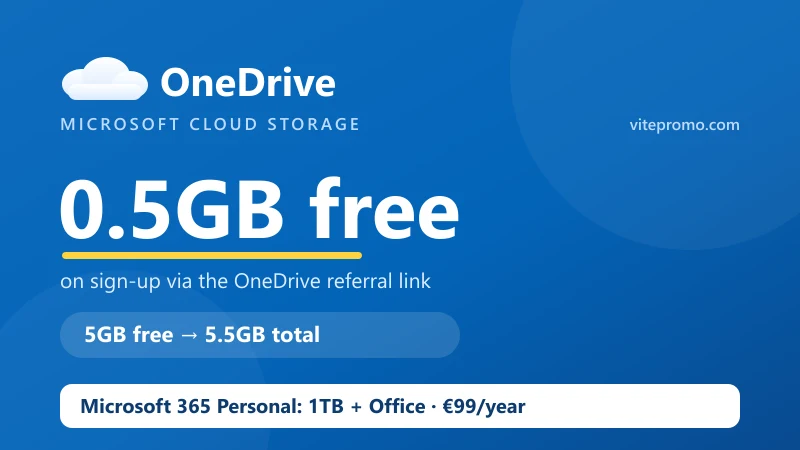
OneDrive storage plans overview
The OneDrive plans available:
| Plan | Storage | Price | Included |
|---|---|---|---|
| Free | 5GB | €0 | Basic |
| 100GB (Microsoft 365 Basic) | 100GB | €2/month or €20/year | Storage + ad-free Outlook |
| Microsoft 365 Personal | 1TB | €10/month or €99/year | Office + 1TB OneDrive |
| Microsoft 365 Family | 6TB (1TB × 6 people) | €13/month or €129/year | Office + OneDrive × 6 |
Good to know: the price rise that took effect on 1 July 2026 applies to business plans (Business Standard moved from about $12.50 to $14/month, Business Basic, E3/E5). The consumer plans above are unchanged. The annual plan stays cheapest: €99/year works out to €8.25/month vs €10/month.
OneDrive activation times and offer expiry
OneDrive is a Microsoft service: activation of paid plans is near-instant (a few minutes at most after payment). Crediting of the referral bonus, however, can lag since late 2024 — Microsoft hasn't ended it, but check your quota on onedrive.com.
For annual subscriptions (Microsoft 365 at €99/year), the term runs from the activation date — check the expiry date in your Microsoft account settings to anticipate renewal.
Watch out for time-limited bonuses: some OneDrive codes grant bonus storage for a set period (12 months, for example) — at expiry, the bonus disappears and files stored beyond the remaining quota become read-only (but aren't immediately deleted). Check the duration tied to your OneDrive voucher before activating.
OneDrive promo code: how it really works
OneDrive combines two perk mechanics. First, referrals: create your account via an invite link (invref parameter) and both you and the referrer get 0.5GB each, stacking up to 10GB on the referrer's side. Second, promo codes distributed by Microsoft via partners, with Windows device purchases, or via bundles — alphanumeric codes to enter on microsoft.com/redeem.
The distinction from a classic subscription: a OneDrive perk can grant extra storage with no paid subscription (the referral's 0.5GB), a discount on a monthly or annual plan, or a month/year free on Microsoft 365.
For complementary software subscriptions at a reduced price, also see GamsGo, which offers access to Canva Pro, Duolingo and other digital services up to -73% via account sharing.
OneDrive and Microsoft 365: an integration worth knowing
OneDrive isn't just a storage service: it's the cloud hub of the Microsoft ecosystem. Here's what the integration brings concretely:
With Windows 11: automatic backup of desktop, documents and pictures. If your PC fails, all your files are recoverable from any other device.
With Office/Microsoft 365: automatic saving of your Word, Excel and PowerPoint files in OneDrive — no more lost files, and version history kept for 30 days.
Multi-device: a single 1TB subscription accessible from your Windows PC, Mac, iPhone and Android simultaneously.
A OneDrive promo code applied to Microsoft 365 Personal (1TB + the full Office suite) represents the best value in the range.
OneDrive vs Google Drive vs iCloud vs Dropbox
The four main cloud storage competitors compared:
| Service | Free | 1TB | Main strength |
|---|---|---|---|
| OneDrive | 5GB | €10/month (with Office) | Windows/Office integration |
| Google Drive | 15GB | €9.99/month | Android/Docs integration |
| iCloud | 5GB | €9.99/month | iPhone/Mac integration |
| Dropbox | 2GB | €11.99/month | Multi-OS sync |
Verdict for Windows users: OneDrive is the natural choice as it's natively integrated into the OS. The 1TB included in Microsoft 365 Personal (with Word, Excel, PowerPoint) is more economical than Dropbox for professional use. A OneDrive voucher strengthens this advantage further. For zero-knowledge encrypted storage instead, see MEGA and pCloud.
OneDrive in brief: security, sync and strengths
OneDrive is Microsoft's cloud storage service, available since 2007 and integrated into Windows since version 8. With hundreds of millions of active users, it's one of the most used cloud services in the world.
Security: AES-256 encryption at rest and TLS in transit. The Personal Vault adds a two-factor authentication layer for the most sensitive files. Microsoft complies with GDPR for European users.
Strengths: native Windows integration, 30-day version history, cloud recycle bin, real-time Office collaboration, file sharing with granular permissions.
Watch-outs: the 1 July 2026 price rise targets business plans; consumer offers (€99/year, €129/year) stay stable. The annual plan remains cheapest (€99/year = €8.25/month vs €10 monthly). On the referral side, crediting of the 0.5GB bonus can lag since late 2024 — check your quota on onedrive.com.
Conditions to know before subscribing to a OneDrive plan
Before activating your OneDrive promo code:
- Microsoft account required: free to create, but mandatory for any OneDrive subscription.
- Storage bonus duration: check whether the code grants permanent or time-limited storage.
- Price rise from 1 July 2026: it applies to business plans (Business Standard ~$12.50 → $14/month). Consumer plans (Personal €99/year, Family €129/year) are unchanged.
- Supported devices: Windows, macOS, iOS, Android and web browser. No official Linux client (sync via rclone is possible for advanced users).
- Promo code: valid on new subscriptions or storage extensions, generally not on renewals.
New OneDrive offers in 2026: what's changing
Microsoft has unveiled new OneDrive storage tiers — 5TB and 10TB — for Microsoft 365 Personal and Family subscribers, rolling out gradually. These are unprecedented capacities for a consumer service at this price level.
These new tiers target creatives (photographers, videographers) and professionals who exceed the current 1TB threshold. As this rollout progresses, current 1TB plans may benefit from more aggressive OneDrive promo codes — check the offers on this page regularly.
Separately, the 1 July 2026 price rise (Business Basic, Business Standard, E3/E5) mainly concerns business plans. Consumer plans stay stable — an annual subscription (€99/year) remains the most economical strategy.
Frequently asked questions
How do I use a OneDrive promo code?
Enter the code at sign-up on microsoft.com/microsoft-365/onedrive, or alphanumeric storage codes on microsoft.com/redeem. Extra-storage codes credit your existing Microsoft account instantly with no paid plan needed; discount codes apply to a chosen subscription.
How much free storage does OneDrive give?
Every Microsoft account includes 5GB free. A referral link adds +0.5GB to both you and your friend (and up to 10GB in total by referring more people), taking you to 5.5GB — roughly 1,300 photos or 250 Office documents — without paying anything. Beyond that, 100GB is €2/month.
How much is OneDrive 1TB?
1TB comes with Microsoft 365 Personal at €10/month or €99/year, including the full Office suite (Word, Excel, PowerPoint). The Family plan gives 6TB (1TB × 6 people) at €13/month or €129/year. A promo code can add 1-2 months free.
Is OneDrive getting more expensive in 2026?
The 1 July 2026 increase applies to commercial/business plans (e.g. Business Standard from about $12.50 to $14). Consumer plans — 100GB, Personal (€99/year) and Family (€129/year) — are unchanged. The annual plan stays cheapest: €99/year works out to €8.25/month vs €10 monthly.
Is OneDrive secure?
OneDrive uses AES-256 encryption at rest and TLS in transit, complies with GDPR for EU users, and offers a Personal Vault with two-factor authentication for sensitive files. For zero-knowledge encryption where the provider never holds your keys, see MEGA.
OneDrive or Google Drive — which is better?
OneDrive is the natural pick for Windows users thanks to native OS and Office integration, and the 1TB-with-Office bundle is strong value. Google Drive gives more free storage (15GB) and suits Android/Docs users. Pick based on your main ecosystem.