reMarkable promo code 2026: deals on the Paper Pure tablet
Be the first to rate this offer
Promo offer

Remarkable
Bundles + referralValid on Remarkable • Click to claim the offer
About this offer
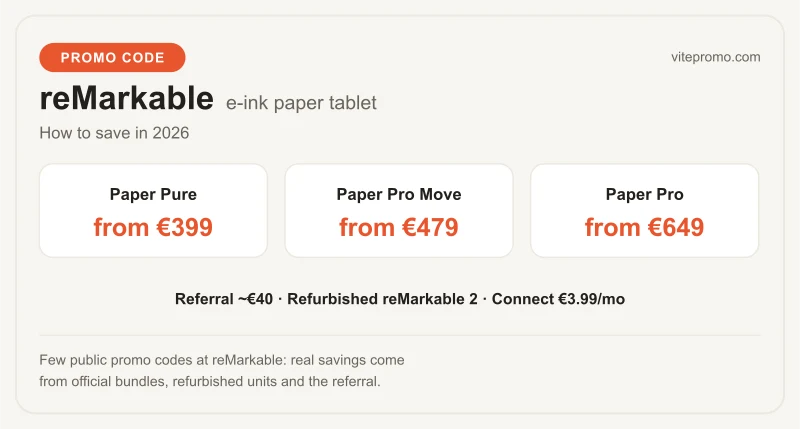
- Paper Pure at €399: 3rd-gen B&W e-ink, 3-week battery, A4 size, 38% recycled materials — replaces the reMarkable 2
- Paper Pro Move at €479: compact 7.3" Canvas Color screen with front light, 230g
- Paper Pro at €649: large colour screen with backlight, for colour annotation and drawing
- Few public promo codes: real savings come from refurbished units, bundles and the referral (~€40)
- reMarkable Connect at €3.99/month (50-day trial): multi-device cloud sync, not required
Click the promo link to access the Bundles + referral on Remarkable. This offer is verified and regularly updated.
How to get a discount on a reMarkable tablet?
reMarkable offers promotions on its tablets during major sales periods (Black Friday, summer sales, back-to-school). reMarkable promo codes are generally distributed via the official newsletter and media partners. To activate a discount, go to remarkable.com, choose your model (Paper Pure or Paper Pro) and enter your code at checkout. reMarkable also offers bundles including the tablet + stylus + cover at a reduced price versus buying separately. The Marker Plus (with eraser) is the best-selling accessory — prefer official packs that often include the Folio cover for better protection.
reMarkable Paper Pure, Paper Pro Move or Paper Pro: which tablet to choose?
reMarkable's line-up has three e-ink tablets as of 2026, all paper-like and distraction-free:
| Model | Starting price | Screen | Best for |
|---|---|---|---|
| Paper Pure | €399 | B&W e-ink (3rd-gen Canvas) | notes, PDFs, reading |
| Paper Pro Move | €479 | 7.3" colour + front light | portability, compact size |
| Paper Pro | €649 | large colour + front light | colour annotation, drawing |
reMarkable Paper Pure (from €399) — launched 6 May 2026 (shipping June 2026). It replaces the now-discontinued reMarkable 2: a brighter 3rd-gen B&W Canvas display, twice as fast, 3-week battery, 38% recycled materials, A4 size and an easy-to-repair design.
reMarkable Paper Pro Move (from €479) — the compact 7.3" colour model (Canvas Color) with a front light, just 230g, up to 2 weeks of battery. A colour e-ink tablet small enough for a pocket.
reMarkable Paper Pro (from €649) — the large colour screen with adjustable backlight, for colour annotation (highlighting, maps, plans) and drawing. The most versatile of the range.
The reMarkable 2 is no longer sold new on remarkable.com but remains a great entry point refurbished. For 95% of users (notes, PDFs, B&W books), the Paper Pure does everything for €250 less than the Paper Pro.
reMarkable e-ink technology: why it's so different from an iPad
reMarkable's e-ink (electronic ink) screen is fundamentally different from an LCD or OLED screen like an iPad's. Key differences:
Paper feel: reMarkable's textured Canvas surface mimics the grain of paper. Writing with the stylus creates a natural resistance similar to pen on paper — a sensation absent on an iPad with Apple Pencil.
Zero blue-light emission: e-ink reflects ambient light like paper, with no emission of its own. Less eye strain during long reading or writing sessions.
Exceptional battery life: with no backlight and near-zero consumption in static mode, the Paper Pure lasts 3 weeks.
No distraction: reMarkable has no apps, notifications, or social media access — deliberately designed for focus.
The reMarkable Connect subscription: is it mandatory?
reMarkable Connect is reMarkable's cloud subscription, billed at €3.99/month (or the equivalent of 10 months per year, about €40/year). A 50-day free trial is included when you pair a tablet. It offers:
- Unlimited cloud sync: your notes and documents synced across all your devices
- Computer and mobile access: Mac/Windows desktop app and iOS/Android mobile app
- Third-party integrations: Google Drive, Dropbox, OneDrive
- Handwriting search and assisted conversion tools
Is it mandatory? No. reMarkable keeps a free tier (handwriting conversion, limited cloud storage, viewing notes in the apps, screen sharing), and the tablet works perfectly offline — transfer files via USB cable or local Wi-Fi with no subscription. Connect is useful once you want your notes on your PC or phone. The choice stays open.
reMarkable for professionals: lawyers, doctors, engineers
reMarkable is especially popular in professions handling large volumes of paper and PDF documents:
Lawyers and legal professionals: annotating contracts, large case files, taking notes in hearings. A reMarkable Paper Pro lets you annotate in colour (highlighting, comments) on PDFs of several hundred pages with a fluidity impossible on paper.
Doctors: annotating scientific articles, taking notes in consultations, digitising handwritten prescriptions.
Engineers and architects: technical diagrams, annotated plans, handwritten calculations converted to text.
Students: replacing every notebook with a single tablet, organising by course, sharing notes with classmates via Connect.
The battery life (3 weeks) is a decisive argument for professionals on the move — no recharge anxiety.
Comparison: reMarkable vs iPad vs Kindle Scribe
Comparison of the main note-taking tablets:
| Criterion | reMarkable Paper Pure | iPad Air | Kindle Scribe |
|---|---|---|---|
| Price | €399 | €699 | €369 |
| Screen | E-ink B&W | LCD Liquid Retina | E-ink B&W |
| Battery | 3 weeks | ~10h | 3 months |
| Paper feel | Excellent | Good (with Pencil) | Very good |
| Apps | None | All (iOS) | Limited |
| Distraction | Zero | High | Low |
| Handwriting-to-text | Yes | Yes | Yes |
reMarkable wins on writing feel and lack of distraction. iPad on versatility. Kindle Scribe on battery life and Amazon/e-reader ecosystem integration. For audiobooks to pair with your reading, see Audible.
reMarkable accessories: Marker, cover and styluses
reMarkable offers a range of accessories to complete the writing experience:
Marker (stylus without eraser): included in some packs, ideal for daily writing
Marker Plus: with an eraser built into the end — the most popular. Erase your notes with no touch menu.
Type Folio (cover with built-in keyboard): turn your reMarkable into a mini typing computer for users who also want to type text
Folio (simple cover): protection with a document-holder function
The stylus nibs wear out over time (the textured surface is abrasive) — replacement nibs are sold separately in packs of 9 or 25. Expect one nib every 3 to 6 months depending on intensity of use. "Hard" nibs (less resistance) or "soft" nibs (more paper feel) are available to personalise the writing experience.
reMarkable and handwriting-to-text conversion (OCR)
One of reMarkable's most appreciated features is converting handwriting into digital text (OCR). This feature, available with Connect or locally, recognises your handwriting and converts it into editable, copyable text in any application. reMarkable's OCR accuracy is excellent for neat handwriting and good for fast handwriting — comparable to the best handwriting OCR solutions on the market. Supported languages include English, French, German and around twenty others. Conversion can be done page by page or across an entire notebook. The converted text can then be exported to PDF, Word, or copied to the clipboard.
reMarkable and PDFs: document annotation and reading
Reading and annotating PDFs is reMarkable's main use for many professional users. You can:
- Import PDFs via the desktop app (Mac/Windows), by email, or via cloud integrations (Google Drive, Dropbox)
- Annotate: highlighting (colour on Paper Pro only), handwritten margin notes, shapes
- Navigate large PDFs (reports of several hundred pages) fluidly
- Export the annotated PDF to your computer or cloud
The e-ink format is especially suited to long PDF reading: no eye strain, an A4-format screen (ideal for native A4 documents without zoom), exceptional battery life. A lawyer can annotate a 300-page case file without recharging for several days.
reMarkable review: what users think
reMarkable earns very high ratings from converted users, with a Trustpilot score above 4.5/5. The most frequent testimonials: "I finally found the replacement for my paper notebook", "the writing feel is stunning", "my productivity increased thanks to the lack of distraction". Criticisms focus on the high price of accessories, the lack of colour on the Paper Pure, and the need for a Connect subscription for advanced cloud features. reMarkable is a niche tablet that fully embraces its limitations: no apps, no games, no YouTube. That's precisely what appeals to its users.
reMarkable purchase terms: warranty, returns and support
reMarkable offers a 2-year manufacturer warranty on its tablets (in line with EU legal warranty). The return policy is 30 days for any direct purchase on remarkable.com — if the tablet doesn't meet your expectations, return it for a full refund. reMarkable support is available by email and chat on remarkable.com — no phone support. The reMarkable software receives regular updates that add new features (new paper textures, OCR improvements, new templates). reMarkable also sells official refurbished tablets at a reduced price — a good option to save on entering the ecosystem.
In the high-tech & digital category, also discover Cewe for photo prints, MPB for used photo gear and Rakuten for tech deals.
Frequently asked questions
How do I get a reMarkable discount?
Discounts appear at Black Friday, summer sales and back-to-school via the newsletter and media partners — enter the code at checkout on remarkable.com. Tablet + Marker + Folio bundles are also cheaper than buying the items separately.
reMarkable Paper Pure, Paper Pro Move or Paper Pro?
Three models since 2026: Paper Pure (from €399) is B&W e-ink with a 3-week battery, ideal for notes and PDFs, and replaces the reMarkable 2. Paper Pro Move (from €479) is a compact 7.3" colour tablet with a front light. Paper Pro (from €649) adds a large colour screen and backlight for colour annotation and drawing. For most note/PDF users, the Paper Pure does everything for €250 less than the Paper Pro.
Is the reMarkable Connect subscription mandatory?
No — the tablet works fully offline and you can transfer files via USB or local Wi-Fi for free, and reMarkable keeps a free tier (handwriting conversion, limited cloud storage, note viewing). Connect (€3.99/month or about €40/year, with a 50-day free trial) adds unlimited cloud sync, desktop/mobile access and integrations with Google Drive, Dropbox and OneDrive.
How is reMarkable different from an iPad?
Its e-ink Canvas surface gives a true paper-like writing feel, emits no blue light, lasts 3 weeks on a charge, and has no apps or notifications — built for focus. An iPad is far more versatile but more distracting and lasts ~10 hours.
Can reMarkable convert handwriting to text?
Yes — its OCR converts handwriting into editable, copyable text in around twenty languages including English and French, page-by-page or across a notebook, exportable to PDF, Word or the clipboard. Accuracy is excellent for neat writing.
What is reMarkable's return policy?
Direct purchases on remarkable.com have a 30-day return window for a full refund, plus a 2-year manufacturer warranty. reMarkable also sells official refurbished tablets at a lower price — a cheaper way into the ecosystem.
Does reMarkable have a referral or promo code?
reMarkable rarely issues public promo codes. Its referral program is active, though: a referral link gives your friend a discount and rewards you (around $40, or ~€40 / 10% depending on currency and model) once they keep their tablet. Combined with refurbished units and seasonal sales, it is one of the few ways to save on a new reMarkable.