
Dropbox promo code 2026: referral up to 32GB + 30-day free trial
Be the first to rate this offer
Promo offer

Dropbox
30-day trial + referral storageValid on Dropbox • Click to claim the offer
About this offer
- Dropbox is the pioneer of consumer cloud storage with best-in-class sync:
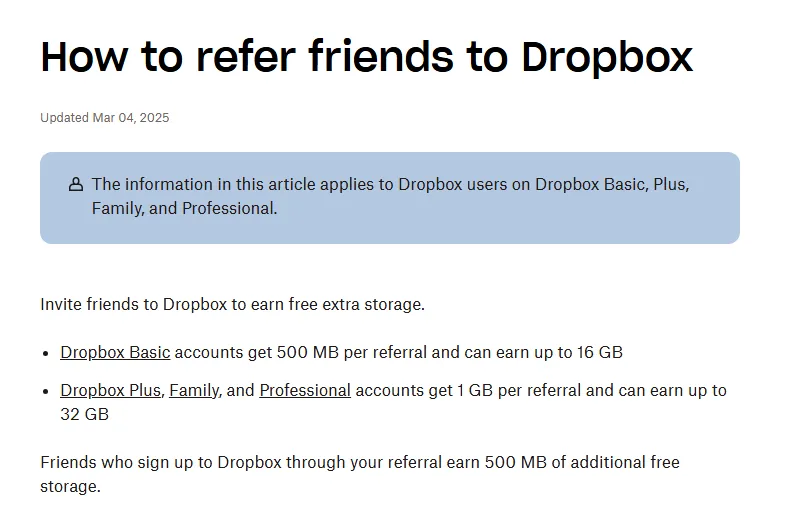
- 30-day free trial on Plus; earn up to 16GB free via referral (500MB/friend, 1GB on Plus up to 32GB)
- Plus 2TB €9.99/month, Family 2TB for 6 users €16.99/month (checked July 2026)
- Differential sync across Windows, Mac, Linux, iOS and Android
- 700M+ registered users; excels on Mac/Linux where rivals integrate less well.
Click the promo link to access the 30-day trial + referral storage on Dropbox. This offer is verified and regularly updated.
Dropbox: the pioneer of cloud storage for individuals and businesses
Dropbox is one of the first consumer cloud storage services, founded in 2007. It lets you sync files between your devices (computer, mobile, tablet), share folders with collaborators and access your documents from anywhere. Dropbox popularised the concept of automatic file sync via a local folder mirrored in the cloud. With its 700 million registered users, it remains a reference despite competition from Google Drive and OneDrive.
Dropbox plans for individuals: Plus, Professional and Family
Dropbox has streamlined its individual line-up to two plans. Dropbox Plus at €9.99/month offers 2TB of storage, remote file deletion from a lost device and Dropbox Rewind (edit-history restore). Dropbox Family at €16.99/month lets 6 users share 2TB with separate individual spaces — prices checked on dropbox.com on 16 July 2026. The former Professional 3TB plan is no longer sold to new customers: professional needs now go through the team plans (Standard, Advanced), which carry a 30-day free trial.
Free Dropbox: what does the Basic plan offer?
The free Dropbox Basic plan offers 2GB of storage, enough for a few light documents but quickly limited for photos or videos. It allows syncing a maximum of 3 devices (a limit introduced in 2019). Version history is limited to 30 days on the free plan. This plan is useful to discover the service before moving to a paid subscription. Extra GB can be earned via referral (500MB per friend, up to 16GB).
Dropbox sync: how does it work?
Dropbox creates a local folder on your computer (Windows, Mac or Linux). Any file placed in this folder is automatically synced to the cloud and to all your devices connected to your account. Sync is differential (only the modified parts are transferred), making it fast even for large files. Dropbox supports all desktop apps and offers official clients for iOS and Android.
Dropbox and collaboration: folder sharing and comments
Dropbox is widely used in professional contexts for folder sharing between collaborators. A share link can be generated for any file or folder, accessible to people without a Dropbox account (read-only) or with edit permissions (for accounts). Business subscriptions add advanced controls (granular access rights, admin console) and let you manage teams from a centralised dashboard.
How to use a Dropbox promo code?
There is no permanent "promo code" field on dropbox.com: the real savings come from the 30-day free trial on Plus (card registered, charged only at the end), annual billing (cheaper than paying monthly) and the referral program, which adds free storage. The only verifiable official promotions are the device and partner offers documented on help.dropbox.com: 25% off Dropbox Plus for 12 months (plus 500GB of bonus storage for 6 months) with an eligible ASUS computer that ships with Dropbox preinstalled, or 25GB free for 6 months via the Pixlr partnership. Students can benefit from specific education offers with an academic email. Be wary of coupon sites advertising "-70%" Dropbox codes: no such public code could be verified in July 2026.
Dropbox referral: 500MB free per friend
Dropbox's historic referral program is still active: 500MB of extra space per referral (up to 16GB total) on the free Basic plan, and 1GB per referral (up to 32GB) on paid plans (Plus, Family, Professional). Your friend also receives 500MB. The bonus is granted once your friend creates an account via your link, installs the desktop app, signs in and verifies their email. Your referral link lives in your Dropbox account settings.
Dropbox vs Google Drive vs OneDrive: comparison
The three main cloud services (Dropbox, Google Drive, OneDrive) have different positioning. Google Drive offers 15GB free (but shared with Gmail) and integrates naturally with Google Workspace tools. OneDrive is built into Windows 11 and Microsoft 365, offering 5GB free and 1TB with Microsoft 365. Dropbox offers only 2GB free but excels at cross-platform sync quality (Windows, Mac, Linux, mobile) and reliability for demanding professional use. For encrypted alternatives, see MEGA and pCloud.
Dropbox mobile app: access your files anywhere
The Dropbox app for iOS and Android lets you access all your files from your smartphone, share them, open them in compatible mobile apps and download them offline. The built-in "Document scan" feature lets you scan documents with the phone camera, converts them to PDF and syncs them automatically to Dropbox. Photos can be backed up automatically from the gallery.
Dropbox review: a cloud-sync reference
Dropbox is unanimously recognised for the quality and reliability of its sync, particularly on Mac and Linux where Google Drive and OneDrive integrate less well. Professional users praise the robustness of shared-folder sync. Criticisms focus on the price being higher than competitors and the free space limited to 2GB, now insufficient for everyday use.
Subscribing to Dropbox: free trial and first payment
Creating a free Dropbox account is instant on dropbox.com with your email. For Plus, start the 30-day free trial with no commitment — your card is registered but charged only at the end of the trial. Install the desktop and mobile app to start syncing, and prefer annual billing to lower the effective monthly price.
In software & cloud, also explore OneDrive for Microsoft 365 integration, Dashlane for password security and GetResponse for email marketing.
Frequently asked questions
How do I get a Dropbox discount?
Start the 30-day free trial on dropbox.com (card charged only at the end) and earn free storage via referral: 500MB per friend up to 16GB on Basic, or 1GB per friend up to 32GB on Plus. Students can get specific education offers with an academic email.
How much does Dropbox cost?
Plus is €9.99/month for 2TB and Family €16.99/month for 6 users sharing 2TB (prices checked July 2026). The former Professional plan is no longer sold to new customers — professional needs go through the team plans. A free Basic plan offers 2GB on up to 3 devices.
Is Dropbox's free plan enough?
The free Basic plan gives 2GB on a maximum of 3 devices with 30-day version history — fine to try the service but quickly limited for photos or video. You can earn up to 16GB free via referral, or upgrade to Plus (2TB) for serious use.
How does Dropbox referral work?
Each friend who signs up and installs the app via your referral link gives you 500MB of extra free space, up to 16GB total on the free plan. Paid plans may earn credits or free months depending on promotions. The link is in your account settings.
Dropbox vs Google Drive or OneDrive?
Dropbox gives only 2GB free but leads on cross-platform sync quality and reliability, especially on Mac and Linux. Google Drive offers 15GB free with Workspace integration; OneDrive 5GB (1TB with Microsoft 365) and Windows integration. For encryption, see MEGA.
Is there a Dropbox free trial?
Yes — Plus and Professional have a 30-day free trial with no commitment; your card is registered but only charged at the end. A promo at sign-up can extend the trial or cut the first month's price.
How to get Dropbox Plus for free?
There is no permanently free Plus tier, but three official levers: the 30-day free trial (card charged only at the end), the referral program (500MB per friend up to 16GB on Basic, 1GB up to 32GB on paid plans) and device offers — 25% off Plus for 12 months plus 500GB free for 6 months with an eligible ASUS computer, or 25GB for 6 months via the Pixlr partnership.